Case study

HumDocs

Pick a finish time. It handles the rest.

RoleSolo. Product, code, testing, releases.
Built withJavaScript, Chrome Manifest V3, Supabase, Stripe
TimelineStarted December 2025. Public since April 15, 2026.
StatusLive, version 2.3.8
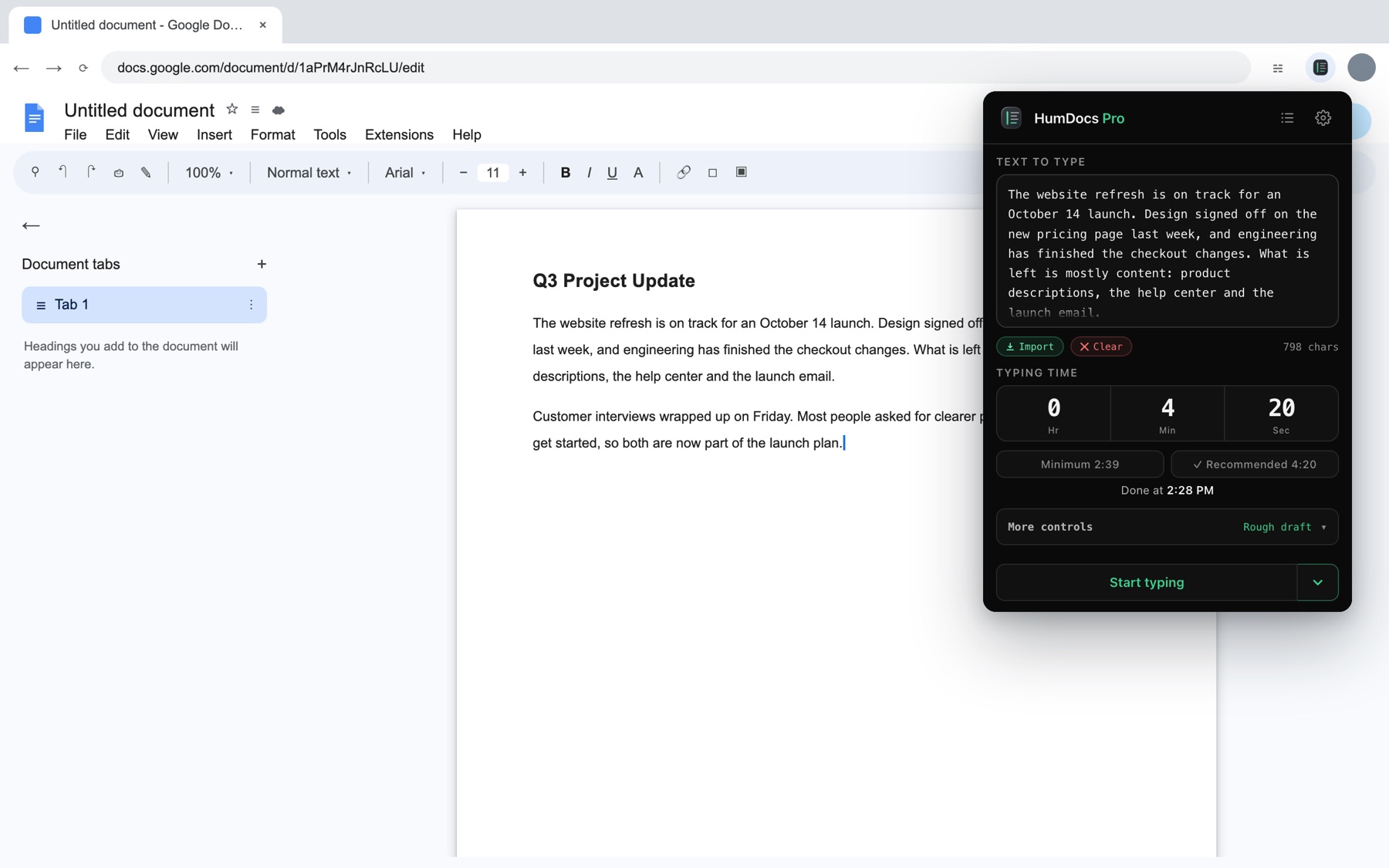
HumDocs open over a Google Doc, with a finish time set and Start typing ready.

Why it exists

It started as a question.

Could a browser extension type into a Google Doc the way a person types at a keyboard, and finish at exactly the time you pick? I was curious, so I built it to find out.

The first version answered the question. Making it dependable turned out to be the real project. Google Docs is an editor I don’t control. Chrome slows down tabs you aren’t looking at. Reloads lose letters. And once it worked, I wanted it to pay for itself, which meant accounts, licenses and payments.

You paste text, choose when it should be done, and press Start typing. HumDocs plans the pace, the pauses and the corrections so the run ends on time, in Docs or Slides, even with the tab in the background.

What I built

The whole thing, end to end.

The extension

  • The typing planner and the scaler that fits it to a finish time
  • The popup, the in-Doc timer and the reference card
  • Background typing and Type later, which starts on its own
  • Google Slides support and carrying on after a reload

Everything around it

  • humdocs.com on Cloudflare Pages
  • Accounts and licenses on Supabase: Postgres, row-level security, 13 edge functions
  • Payments through Stripe Checkout and signed webhooks
  • Tests, releases and the store listing

How I build. I use AI coding tools, mainly Claude Code, to write much of the code. I decide what the product does, review every change, design and run the tests, chase bugs in real Docs, and decide what ships.

How it works

Plan first. Then type.

HumDocs doesn’t pace itself live. It plans every keystroke, pause and correction up front, then scales the plan so it lands on your finish time.

In your browserDocument text never leaves it
PopupYour text and a finish time
PlannerKeystrokes, pauses, typos and fixes
ScalerStretches or squeezes the plan to your time
Google DocTyped as keyboard events, in order

A background worker times the waits when the tab is hidden, keeps the computer awake, and starts Type later runs.

On my serverOnly licenses, trials and anonymous counts
Stripe CheckoutThe buyer pays
WebhookChecks Stripe’s signature, issues a key
Licenses tablePostgres, row-level security on
License checkReturns a ticket signed by the server

The extension unlocks Pro only with a ticket that verifies against the server’s public key, so editing storage by hand does nothing.

Decisions

The calls I’d make again.

The hardest call

Plan the whole run first. Then scale it.

The obvious design paces itself live: type a letter, wait, type the next. But then the finish time drifts, and nothing about a run can be checked before it happens. Instead HumDocs builds every keystroke, pause and correction up front, then scales that plan so it lands exactly on the time you picked.

That makes the finish exact and the planner deterministic, so tests can check a plan’s length, pace and text without ever opening a Doc.

Cost: it has to refuse finish times shorter than the plan’s minimum, and any change mid-run means scaling the rest of the plan again.

When the server can’t be reached

Fail safe, not shut.

Pro turns off only when the server explicitly says a key is bad. Offline, a 15-second timeout or a 5xx error keeps the last good answer. An outage should never lock out someone who paid.

Cost: a revoked key keeps working while offline. I accepted that.

Payments and licenses

Two separate records.

Stripe tells my server a payment happened. The server issues a license. The extension only ever asks about the license. Refunds and lost disputes revoke it; a won dispute restores it.

Cost: a webhook that has to handle every payment event correctly. It’s idempotent on the checkout session.

Tabs in the background

Don’t catch up in a burst.

Chrome slows a hidden tab’s timers to about one tick a second. HumDocs times those waits through its background worker instead, and when a run does fall behind, it writes the lost time off rather than typing fast to recover.

Cost: a run can finish up to 1.5 seconds late.

Privacy

Your text stays in Chrome.

The extension’s requests carry a license key, a random install ID, or an anonymous count like “a run started.” Never the text, and nothing about the Doc.

Cost: I can’t see what goes wrong in someone’s run unless they tell me.

Pricing

One price, paid once.

Pro is $20, once, not a subscription. People use HumDocs in bursts, so a monthly plan would mostly be cancelled after the first month. A free trial lets people try Pro first.

Rule I kept: anything that makes runs correct stays free. Only extra features are Pro.

Copy protection

No DRM theatre.

Anyone can read an extension’s source code, so the paywall can only ever be a polite fence. I made it hard to fake by accident (signed tickets) and stopped there, instead of spending weeks on obfuscation that would only slow down real customers.
Testing

Tested against the real thing.

A fake page can’t show what Google Docs actually saves. So the tests that matter run in real Chrome, in a real Doc.

214

unit tests. They load the shipping extension code into Node instead of copying logic out of it.1

~95

checks every morning. A GitHub Actions job types into a real Google Doc and Slides deck, and also tests the version that’s live on the store.

1ms

An audit across thousands of plans found every run ending within a millisecond of its chosen time.2

Between those, end-to-end scripts load the unpacked extension into Chrome, type into a test page and record every keystroke. They check exact text, timing, pauses, breaks, background tabs and keeping the computer awake.

What broke

And what I changed.

“part way” came out “party”.

Found by the daily canary

If the Doc reloaded mid-run, Google hadn’t saved the last few letters yet, so the run carried on without them.

Fix: on resume, HumDocs finds its last typed words, works out how many letters were lost and types them again first.

Emoji arrived as “?”.

Found in a real Doc

Synthetic key events can’t produce emoji in Docs, and paste only works while the tab has focus, which background runs never have.

Fix: leave emoji out and warn before the run starts, instead of typing garbage.

The time estimate was up to 2x wrong.

Found by an audit

The popup’s “Recommended” time came from its own simplified model, which drifted from what the planner really did.

Fix: derive it from the planner’s own numbers. It now lands within about 10% on every kind of text I tested, and a test checks the two agree.

A refund could revoke the wrong key.

Found by reviewing my own webhook

A refund or dispute without a payment ID could match someone else’s license.

Fix: rewrote the webhook’s matching before checkout opened, along with retries on key clashes and keeping licenses on partial refunds.

The website served its own internals.

Found by checking the live site

Cloudflare was publishing the whole repository, and a redirect rule meant to hide internal files could be bypassed with an encoded path.

Fix: moved the site into its own folder and made Cloudflare publish only that. Every internal path now returns a 404.

How it changed

From experiment to product.

  1. Started buildingOut of curiosity, as a browser extension with no backend.
  2. First published on the Chrome Web StoreFree, extension only. No accounts.
  3. Put under version controlThe code had lived in ten near-identical folders. I recovered the 2.0.0 source from the copy installed in Chrome.
  4. 2.2.1, and the backend goes liveSupabase accounts and licensing deployed, with sign-in by emailed code.
  5. 2.3.0 submitted: Pro and SlidesThe first paid version. Everything that made runs correct stayed free.
  6. 2.3.4 live: Type laterRuns that start by themselves, even with the tab closed.
  7. 2.3.8 acceptedNext: typing formatting (bold, headings, lists) with Docs’ own shortcuts.

What I learned

What I’d tell myself when I started.

Test the real thing.

My fake Docs page passed tests that a real Doc failed. The canary exists because the bugs that mattered only showed up in Google’s editor.

Duplicate logic drifts.

Two models of the same timing disagreed by up to 2x. Now the estimate comes from the planner’s own numbers, and a test fails if the two ever disagree.

Use git from day one.

Eight months without version control meant digging a release out of my own browser. Every project since starts with a repository.

What I’d improve next.

The popup and the planner still keep two copies of some timing math, held in step by a test. I’d move them into one shared module so they can’t drift at all.

Next case study

Even Up ›